PRINT PLAYBOOK GUIDE - INDUSTRY INSIGHTS
Part of Series: Learn Wholesale Printing
Start Here for Wholesale Printing
 ND4C Print Experts

Quick Answer
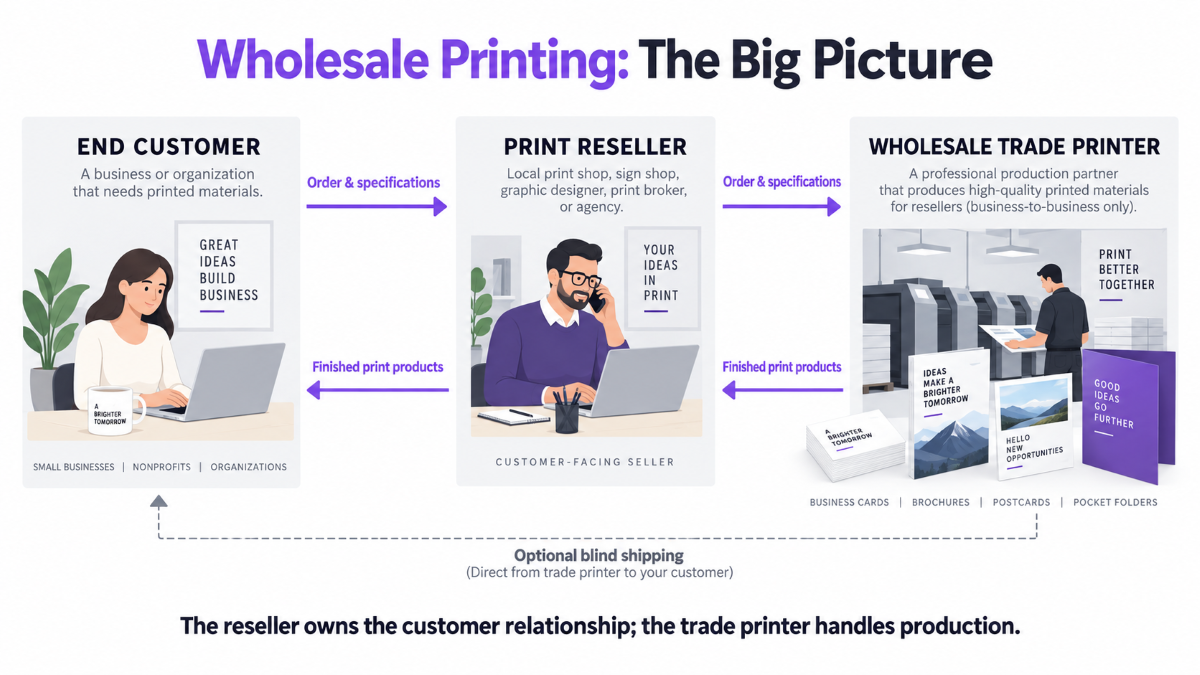
Wholesale printing is a business-to-business printing model in which a trade printer produces printed products for another business to resell, fulfill, or provide to its customers. The trade printer handles production while the customer manages the end-client relationship, pricing, project management, and other customer-facing responsibilities.
Wholesale printing is commonly used by print shops, graphic designers, print brokers, sign shops, marketing agencies, and print resellers that need professional production without producing every job in-house.
If you are new to the model, start by understanding how trade printing works, then learn how to choose a printer, evaluate costs, prepare files, and manage production.
30-Word Definition
Wholesale printing is business-to-business print production where a trade printer manufactures products for another business, allowing that business to resell, fulfill, or provide printing without producing everything in-house.
What Is Wholesale Printing?
Wholesale printing separates print production from the customer-facing business.
A business sells or manages a print project, then sends the production work to a wholesale or trade printer. The printer manufactures the order according to the specified product, quantity, materials, printing method, finishing, and other requirements.
For example:
1. A designer creates a restaurant menu. 2. The client approves the design. 3. The designer submits the print-ready file to a trade printer. 4. The printer produces the menus. 5. The finished order is shipped to the designer, their customer, or another destination. 6. The designer bills the customer according to their own pricing.
The designer does not need to own the equipment required to produce the menus.
That is the basic wholesale printing model.
Key Takeaways
- Wholesale printing is B2B production. The trade printer supplies another business rather than primarily serving the final consumer.
- The printer handles manufacturing. The customer can outsource production without owning every piece of required equipment.
- The trade customer generally owns the client relationship. This includes quoting, pricing, communication, and project management.
- Outsourcing can expand production capabilities. A business can offer products it cannot efficiently produce internally.
- The best outsourcing decision depends on the job. Quantity, product, materials, production method, turnaround, shipping, and cost all matter.
- You do not need to learn everything at once. Start with the basic model, then follow the guide that answers your next question.
Who Uses Wholesale Printing?
Wholesale printing is useful for businesses that sell, design, manage, or fulfill printed products.
| Business | Typical Use |
|---|---|
| Print shops | Outsource products, equipment-intensive jobs, overflow, or specialty work |
| Graphic designers | Manage production without owning commercial printing equipment |
| Print brokers | Coordinate production while managing the customer relationship |
| Sign shops | Outsource related printed products outside their normal capabilities |
| Marketing agencies | Produce campaign, event, promotional, and marketing materials |
| Print resellers | Purchase production and resell finished products to their customers |
A business can outsource some jobs or nearly all production. Wholesale printing does not require an all-or-nothing approach.
How Wholesale Printing Works
The exact workflow varies by printer, but the basic process is:
1. Define the Project
Determine the product, quantity, size, material, colors, finishing, deadline, and delivery requirements.
2. Prepare the Artwork
Create a print-ready file that meets the printer's specifications for dimensions, bleed, resolution, color, fonts, and other requirements.
See File Setup Guide for detailed file preparation.
3. Select the Production Method
The appropriate method depends on the product, quantity, color requirements, materials, turnaround, and cost.
See Digital vs Offset and Spot Color vs CMYK for production-specific guidance.
4. Submit the Order
Provide the printer with the specifications and artwork required to produce the job.
5. Production and Fulfillment
The printer produces, finishes, packages, and ships the order according to the selected specifications.
Depending on the printer, fulfillment may include blind shipping, allowing the trade customer to ship directly to its customer without presenting the wholesale printer as the supplier.
See Blind Shipping Explained for more information.
Why Do Businesses Outsource Print Production?
Equipment and Capabilities
A business cannot efficiently produce every product, material, size, or finishing combination with one set of equipment.
Outsourcing provides access to production capabilities without purchasing and maintaining every machine required.
Capacity
A print shop may have more work than its equipment or staff can handle.
Outsourcing can provide additional production capacity without requiring an immediate equipment investment.
Product Expansion
A business can offer products it does not normally manufacture.
For example, a shop that primarily produces paper products may outsource synthetic menus or other specialty products.
Production Economics
For some jobs, outsourcing may make more sense than purchasing equipment, materials, labor, and production capacity internally.
The correct comparison is the total cost of producing the job, not simply the wholesale invoice.
Wholesale Printing vs. In-House Production
Many businesses use both models.
| Factor | In-House | Wholesale Outsourcing |
|---|---|---|
| Equipment | Owned internally | Provided by printer |
| Production labor | Internal | Primarily handled by printer |
| Equipment investment | Higher | Lower |
| Product range | Limited by equipment | Can extend beyond internal capabilities |
| Production control | Direct | Managed through printer and specifications |
| Capacity | Limited by internal resources | Can supplement internal capacity |
| Specialized production | Requires appropriate equipment | Can be outsourced |
| Customer relationship | Internal | Usually remains with trade customer |
The right choice depends on the product, quantity, equipment, labor, deadline, and economics of the individual job.
How to Decide If Wholesale Printing Makes Sense
Ask these questions before choosing between internal and outsourced production.
Can I produce the job efficiently?
If you already have the equipment, materials, labor, and capacity, in-house production may make sense.
If the job requires capabilities you do not have, outsourcing becomes more attractive.
Is the quantity appropriate?
Quantity can affect which production method is most practical. A short-run job and a high-volume job may require different approaches.
See Short Run Printing Explained for more information.
Does the job require specialized materials or finishing?
If the project requires equipment or materials outside your normal capabilities, outsourcing can expand what you can offer.
Can the printer meet the deadline?
Consider the entire timeline:
Order cutoff >Production > Finishing > Shipping > Delivery
Production turnaround is not the same as total delivery time.
See Turnaround Times Explained.
Does the economics work?
Consider:
- Production
- Materials
- Finishing
- Shipping
- Internal labor
- Handling
- Overhead
- Customer selling price
- Desired profit
The goal is not simply to find the lowest wholesale price. It is to find a production solution that works for the entire job.
What Does Wholesale Printing Cost?
There is no single wholesale printing price.
The cost of a job can depend on:
- Quantity
- Finished size
- Paper or substrate
- Printing method
- Number of colors
- Ink coverage
- Finishing
- Binding
- Setup requirements
- Production complexity
- Turnaround
- Shipping
When comparing printers, evaluate total delivered production cost rather than only the base printing charge.
A printer with a lower production price may not produce the lowest overall cost if shipping, turnaround, file requirements, or other project factors create additional expenses.
For a deeper breakdown, see How Much Does Wholesale Printing Cost?
What to Look For in a Wholesale Printer
Before choosing a trade printer, evaluate:
Product Range
Does the printer offer the products your customers need?
Production Capabilities
Can it handle your required quantities, materials, printing methods, and finishing?
File Requirements
Are specifications clear and practical for your workflow?
Turnaround
Are production times and cutoff requirements clearly communicated?
Shipping
Can orders be delivered where you need them, within the required timeframe?
Fulfillment
Does the printer offer blind shipping or other fulfillment options if your business needs them?
Quality and Consistency
Can the printer reliably reproduce repeat orders?
Customer Support
How are file problems, production questions, defects, and reprints handled?
Pricing
Does the complete cost work with your resale pricing and margin requirements?
For a complete evaluation framework, see How to Choose a Wholesale Printer.
Common Mistakes
| Mistake | Why It Causes Problems | Better Approach |
|---|---|---|
| Choosing only by price | Lowest production cost may not mean lowest total cost | Compare total delivered cost |
| Ignoring file requirements | Incorrect files can delay production | Check specifications before submission |
| Forgetting shipping time | Production time does not equal delivery time | Build the entire timeline |
| Assuming every product uses the same process | Products and quantities have different production requirements | Evaluate the job before selecting the method |
| Ignoring internal labor | Outsourcing may still require significant handling and management | Include your complete job cost |
| Choosing a printer before defining requirements | Different printers have different capabilities | Define your needs first |
Wholesale Printing Checklist
Before outsourcing a job, identify:
Project
- Product
- Quantity
- Finished size
- Material
- Color requirements
- Finishing
- Deadline
- Delivery destination
Production
- Required printing method
- File requirements
- Production turnaround
- Shipping time
- Fulfillment requirements
Business
- Wholesale production cost
- Shipping cost
- Internal labor
- Customer selling price
- Markup
- Gross margin
- Total profitability
Having these details defined makes it much easier to compare production options and printers.
Where Should I Go Next?
You do not need to read the entire Print Playbook in order. Choose the guide that matches the question you are trying to answer.
If you're completely new to trade printing
How Trade Printers Work Understand the relationship between a trade printer and the business purchasing the production.
If you're comparing printing options
Wholesale Printing vs Local Commercial Printing Understand the differences between outsourcing to a trade printer and working with a local commercial printer.
If you're ready to find a printer
How to Choose a Wholesale Printer Learn how to evaluate printer capabilities, quality, turnaround, shipping, support, and pricing.
If you're trying to understand pricing
How Much Does Wholesale Printing Cost? Learn what actually drives the cost of a wholesale print job.
If the terminology is unfamiliar
Wholesale Printing Terminology Build a working understanding of the terms used throughout the trade-printing industry.
If you're ready to outsource a job
How to Outsource Print Production Follow the process for moving a print project from your customer to an outside production partner.
If you're working with production specifications
File Setup Guide Learn how to prepare artwork for professional print production.
Digital vs Offset Understand the major differences between digital and offset printing.
Turnaround Times Explained Learn how production schedules, cutoff times, and shipping affect delivery.
Blind Shipping Explained Understand how direct-to-customer fulfillment can work for trade customers.
Related Products and Applications
Wholesale printing can be used for many common commercial print applications, including:
- Business cards for professional and promotional use
- Brochures and flyers for marketing and sales materials
- Postcards for direct mail, promotions, and announcements
- Synthetic products where durability or moisture resistance is important
- Signage that requires production capabilities outside the customer's normal equipment
- Short-run products where smaller quantities are more appropriate
The right product, material, and production method should be selected according to the application's requirements rather than simply choosing the lowest-cost option.
Final Next Step
New to wholesale printing? Start with How Trade Printers Work.
Already ready to outsource? Go to How to Outsource Print Production.
From there, use the Print Playbook to answer the specific production, file, color, turnaround, fulfillment, and product questions that arise as you work through your projects.
ND4C is a wholesale trade printer with more than two decades of industry experience. Our Print Playbook guides draw on firsthand expertise across prepress, production, customer support, design, and print technology to help retail printers and print resellers make better production decisions.