PRINT PLAYBOOK GUIDE - FILE SETUP & DESIGN
Part of Series: File Setup
300 DPI Explained: What It Means for Print Quality
 ND4C Print Experts

For most commercial printing projects, 300 pixels per inch (PPI) at the final printed size is a reliable target for photographs and other continuous-tone raster images. Although commonly called “300 DPI,” this recommendation refers to image pixels, not the physical dots a printing device produces. A properly sized 300 PPI image is generally sufficient for professional business cards, brochures, postcards, and flyers.
What Does 300 DPI Mean in Printing?
In everyday print terminology, “300 DPI” usually means that a digital image provides approximately 300 pixels for each inch of its final printed dimensions. A photograph printed at 4 × 6 inches therefore needs roughly 1,200 × 1,800 pixels to reach 300 PPI. That level of detail is generally appropriate for images viewed at normal reading distance.
DPI vs. PPI: What Is the Difference?
PPI (pixels per inch) describes the density of digital image pixels at a specified reproduction size. DPI (dots per inch) describes the physical marking resolution of a printer or output device. Commercial printing may use halftone screening or other dot arrangements to reproduce the tones represented by image pixels.
| Measurement | PPI | DPI |
|---|---|---|
| Describes | Image pixels per printed inch | Physical output marks per inch |
| Depends on | Pixel dimensions and placement size | Output equipment and settings |
| Prepress relevance | Available image detail | Device marking capability |
A commercial press can have a device resolution substantially higher than 300 DPI while reproducing an image supplied at 300 PPI. The two numbers measure different things.
Why Is 300 PPI a Common Printing Standard?
For typical close-viewed commercial print materials, 300 PPI strikes a practical balance between visible detail and manageable file size. It is a recommendation, not a magical threshold: focus, compression, paper, screening, and viewing distance also affect results. A blurry photograph will remain blurry even if its metadata says “300 DPI.”
ND4C's Standard Recommendation
ND4C recommends 300 PPI at final reproduction size for routine raster images. ND4C routinely checks effective image resolution during file review and generally requests higher-resolution replacement artwork when submitted images fall below that recommendation. This can delay production while corrected artwork is supplied. For unusually detailed applications, 600 PPI may sometimes be useful, but it is rarely necessary for ordinary photographs.
Why Does Final Printed Size Matter?
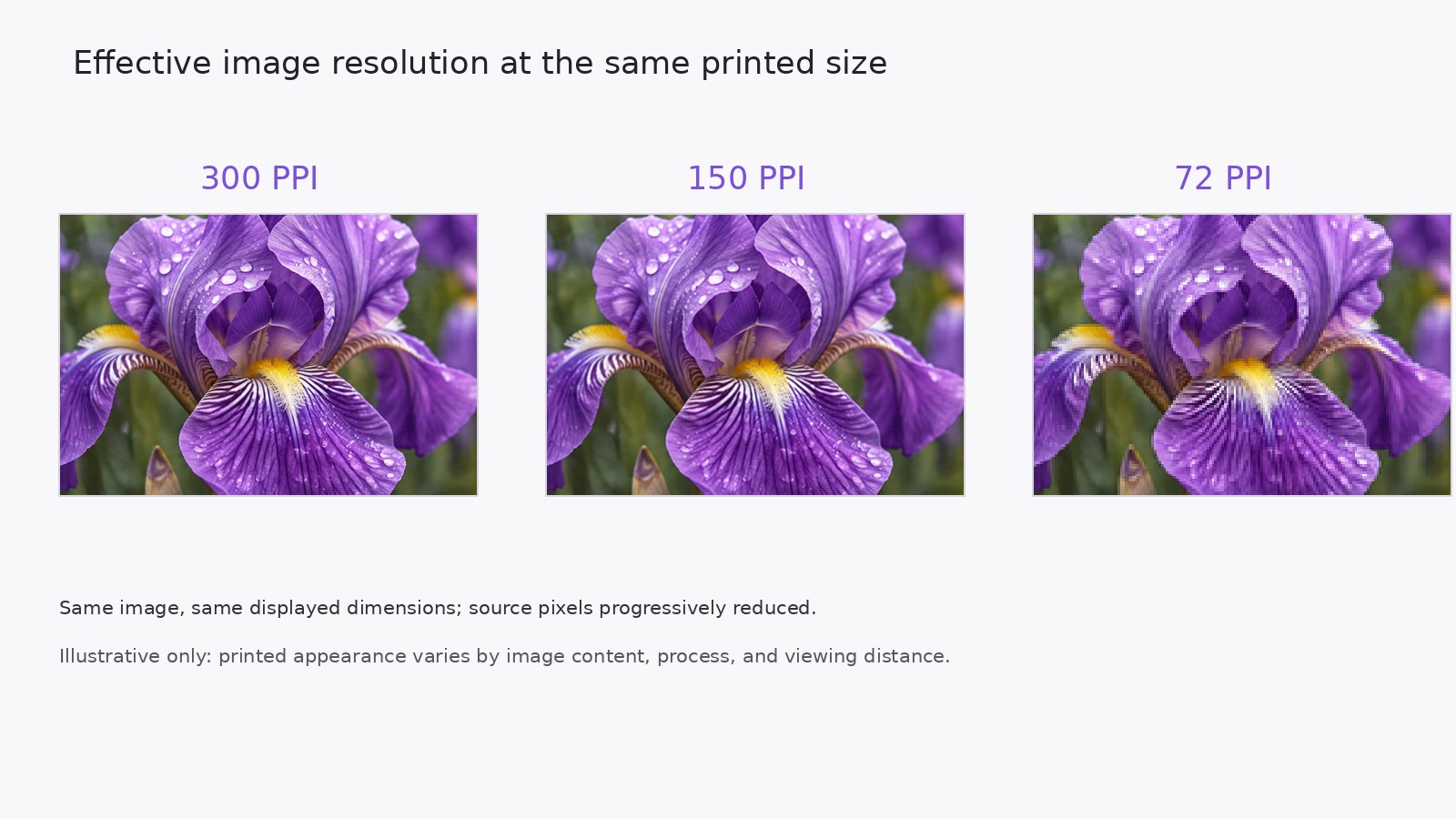
Effective resolution is the number of available source pixels per printed inch after the image has been scaled in the layout. The same file becomes lower-resolution when it is enlarged.
Effective PPI = image pixels ÷ printed inches (calculate width and height separately).
For example, a 1,200 × 1,800-pixel photograph yields the following effective resolutions when printed without distortion:
| Printed size | Effective PPI | Typical implication |
|---|---|---|
| 2 × 3 in. | 600 | More than most photographs need |
| 4 × 6 in. | 300 | Standard commercial target |
| 8 × 12 in. | 150 | Reduced detail; evaluate use |
| 12 × 18 in. | 100 | Likely soft for close viewing |
Changing only the image's assigned PPI value does not change its pixel count. Check the resolution at the size used in the final document, rather than relying on a number shown in file properties.
How Many Pixels Are Needed for Printing?
Multiply the intended image dimensions in inches by the target PPI:
Required pixels = printed inches × 300
| Image area | Pixels at 300 PPI |
|---|---|
| 2 × 3 in. | 600 × 900 |
| 3.5 × 2 in. | 1,050 × 600 |
| 4 × 6 in. | 1,200 × 1,800 |
| 5 × 7 in. | 1,500 × 2,100 |
| 8.5 × 11 in. | 2,550 × 3,300 |
| 11 × 17 in. | 3,300 × 5,100 |
These are image-area calculations, not necessarily full document dimensions. A raster background that extends through bleed must cover the bleed area too. With ND4C's standard 0.125-inch bleed on each side, a full-bleed 4 × 6-inch postcard uses a 4.25 × 6.25-inch artwork area. At 300 PPI, that background would need approximately 1,275 × 1,875 pixels. Product-specific template dimensions take precedence. See Bleed Explained for the complete setup.
When Are Lower or Higher Resolutions Appropriate?
Lower than 300 PPI
Some larger graphics viewed from greater distances can be acceptable at lower effective resolutions. Poster requirements depend on intended viewing conditions and production details; ND4C has established poster-resolution recommendations, but no numerical poster target is stated here until those specifications are supplied. Do not assume lower resolution is automatically accepted for a poster.
600 PPI and Fine Detail
Higher pixel density may help rasterized fine line drawings, intricate monochrome illustrations, or unusually small high-contrast details. Pure black-and-white bitmap line art may sometimes call for even higher resolution. For logos, lettering, and geometric artwork, retaining vector graphics is usually a better approach than rasterizing them at 600 PPI. See Vector vs. Raster Graphics.
Does Changing a File to 300 DPI Improve Its Quality?
Not if the change only updates resolution metadata. A 600 × 900-pixel image can be labeled 300 PPI, but its native size at that resolution is just 2 × 3 inches. Printed at 4 × 6 inches, it still has only 150 effective PPI.
Image editing software can upsample a file by calculating additional pixels, including through AI-assisted methods. Such processing may improve appearance in some cases, but it does not reliably recreate detail that was missing from the source. A suitably detailed original is the dependable starting point.
Common 300 DPI Printing Mistakes
| Mistake | Prevention |
|---|---|
| Checking only file DPI metadata | Inspect effective PPI at final placement size. |
| Enlarging a small image too far | Obtain a larger, sharper original. |
| Assuming 600 PPI always looks better | Use 300 PPI for routine photographs unless more detail is justified. |
| Rasterizing text or logos | Preserve vector elements where practical. |
| Forgetting bleed on full-page images | Work from the product-specific artwork template. |
| Judging quality by pixel count alone | Also inspect blur, noise, and compression. |
Frequently Asked Questions
Is 300 DPI enough for professional printing?
Yes. For most photographs and continuous-tone raster graphics in standard commercial print products, 300 PPI at final size is a reliable target.
Is 300 DPI the same as 300 PPI?
No. DPI is printer marking resolution; PPI is image pixel density. “300 DPI artwork” is common informal wording for 300 PPI images.
Can a 72 DPI image be printed?
Possibly. Its pixel dimensions and final reproduction size determine the effective resolution. The 72 DPI metadata label alone does not establish suitability.
Do offset-printed photographs need 600 PPI?
Usually not. ND4C recommends 300 PPI for routine photographs; unusually detailed raster work is a separate consideration.
Will exporting a PDF at 300 DPI fix low-resolution images?
No. Export settings cannot guarantee that a source image contains enough detail. See PDF Print File Requirements for additional file-preparation guidance.
What happens if I submit a low-resolution image to ND4C?
ND4C routinely checks effective resolution and generally requests replacement artwork when raster images fall below the 300 PPI recommendation. Revisions may delay production.
Prepare Images for Wholesale Printing
Start with sharp original images, check effective resolution at final size, and preserve vector text and logos whenever practical. Every ND4C catalog product offers a free downloadable artwork template that helps establish correct dimensions and bleed. Explore ND4C's wholesale print products and, if you're new to ND4C, sign up to access exclusive trade pricing.
ND4C is a wholesale trade printer with more than two decades of industry experience. Our Print Playbook guides draw on firsthand expertise across prepress, production, customer support, design, and print technology to help retail printers and print resellers make better production decisions.