PRINT PLAYBOOK GUIDE - FILE SETUP & DESIGN
Part of Series: File Setup
CMYK vs RGB for Printing: What's the Difference?
 ND4C Print Experts
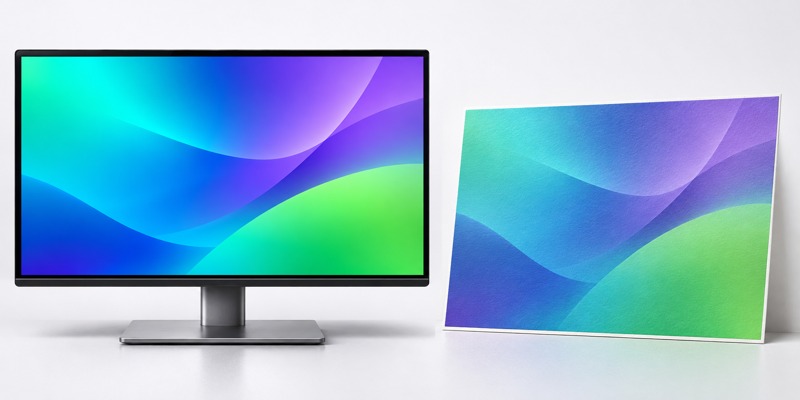
CMYK and RGB are two different systems for producing color. RGB uses red, green, and blue light to create colors on digital screens, while CMYK uses cyan, magenta, yellow, and black inks to reproduce colors on printed materials. CMYK is the traditional color model for full-color commercial printing, but RGB images can also be appropriate in properly color-managed print workflows.
The important distinction is that screens and printing presses reproduce different ranges of color. A vibrant RGB color displayed on a monitor may need to be adjusted when converted for printing because the selected printing process cannot reproduce it exactly.
Understanding these differences helps designers, print shops, and resellers prepare artwork that produces more predictable results and avoids preventable color surprises.
What Is RGB Color?
RGB stands for Red, Green, and Blue. It is an additive color model used by computer monitors, smartphones, televisions, digital cameras, and other electronic imaging devices.
RGB creates colors by combining different intensities of red, green, and blue light.
- Red and green light combine to produce yellow.
- Green and blue light combine to produce cyan.
- Red and blue light combine to produce magenta.
- Red, green, and blue at full intensity produce white.
- The absence of all three produces black.
Because RGB uses emitted light, screens can display certain highly saturated colors that conventional CMYK printing cannot reproduce.
Why RGB Colors Can Look So Vibrant
RGB displays generate light directly. This makes it possible to produce bright blues, greens, and other intense colors that may be outside the available color range of a particular printing process.
However, not every RGB device displays the same colors. Appearance depends on the image's color profile, monitor capabilities, calibration, brightness, and whether the software manages color correctly.
An image that appears vibrant on one monitor may look noticeably different on another.
What Is CMYK Color?
CMYK stands for Cyan, Magenta, Yellow, and Key (Black). It is a subtractive color model commonly used in full-color offset and digital commercial printing.
Unlike RGB, which produces color through light, CMYK printing uses inks or toners on a physical substrate.
When white light strikes a printed surface, the colorants absorb certain portions of the light and reflect others. The reflected light determines the color perceived by the viewer.
- Cyan: Primarily absorbs red light.
- Magenta: Primarily absorbs green light.
- Yellow: Primarily absorbs blue light.
- Black (K): Helps reproduce dark tones, fine detail, text, and neutral areas.
In practical printing, a separate black component improves reproduction and supports more efficient color separation.
Is All Commercial Printing CMYK?
No. CMYK is widely used for process-color printing, but commercial printing also includes spot-color systems, expanded-gamut printing, and other ink configurations.
For example, a customer requiring a particular Pantone ink may need a spot-color process rather than a conventional CMYK approximation.
At ND4C, customer-specified Pantone inks may be accommodated through a custom estimate rather than standard catalog ordering.
Learn more in our Spot Color vs CMYK Printing guide.
CMYK vs RGB: Key Differences
| Feature | RGB | CMYK |
|---|---|---|
| Full name | Red, Green, Blue | Cyan, Magenta, Yellow, Black |
| Color model | Additive | Subtractive |
| Color source | Emitted light | Colorants on a substrate |
| Typical applications | Screens, photography, web graphics | Commercial process printing |
| White | Full-intensity RGB light | Usually the unprinted white substrate |
| Black | Absence of RGB light | Black colorant, sometimes combined with other inks |
| Color gamut | Depends on the RGB color space | Depends on the printing condition and profile |
| Common preparation use | Image editing and original photography | Process-color layout and print output |
Practical takeaway: RGB is appropriate for digital image creation and editing, while CMYK is central to conventional four-color printing. The correct delivery method depends on the printer's workflow.
Why Do RGB Colors Change When Printed?
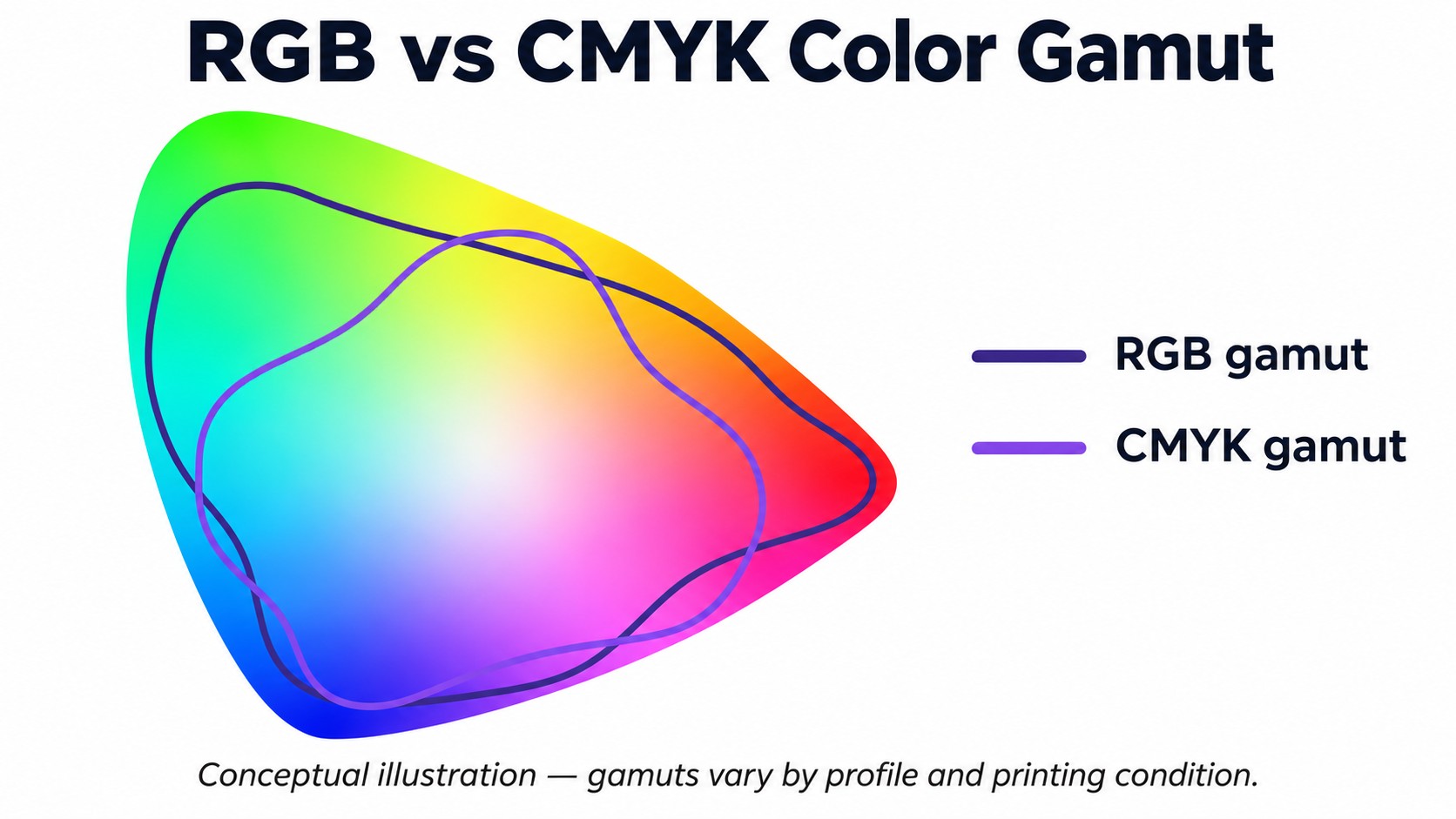
The most important reason is a difference in color gamut.
A color gamut is the range of colors that a particular device, color space, or printing process can reproduce.
Different RGB spaces have different gamuts. Likewise, there is no single universal CMYK gamut: printable colors vary with the ink system, paper, press characteristics, and printing conditions.
A color that falls inside an RGB image's gamut may fall outside the gamut of the intended CMYK printing condition. When that happens, the color must be mapped to a printable alternative.
Example: Bright RGB Green
Imagine a promotional flyer designed with a highly saturated RGB green background.
On a capable monitor, the green may appear exceptionally bright. When converted to the intended CMYK printing condition, it may become less saturated or shift slightly in hue.
This does not necessarily indicate a printing error. The original RGB color may simply be outside the printable gamut.
Similar differences can occur with intense blues, saturated greens, vivid purples, fluorescent-looking colors, and gradients containing out-of-gamut colors.
Does CMYK Always Have a Smaller Gamut Than RGB?
Not in every possible comparison.
Many common RGB working spaces include colors that conventional CMYK printing cannot reproduce. However, the gamuts are not simply nested inside one another, and some printable colors may fall outside a particular RGB space.
The useful question is whether a specific color can be reproduced under the intended printing conditions.
What Happens When RGB Is Converted to CMYK?
RGB-to-CMYK conversion translates colors from a source color space into values suitable for a destination CMYK color space.
This process is more sophisticated than replacing three RGB numbers with four CMYK percentages.
A color-managed conversion considers the source color profile, destination profile, and conversion settings.
For example, a blue defined in an RGB photograph might become a combination of cyan, magenta, yellow, and black percentages. Those values depend on the selected destination profile.
There is no universally correct CMYK formula for converting every RGB color.
Why the Destination Profile Matters
A CMYK profile describes a particular printing condition or reference characterization. It accounts for how the combination of colorants and substrate reproduces color.
A conversion intended for one coated-paper printing condition may produce different separations than a conversion intended for another paper or process.
Choosing an arbitrary CMYK profile can therefore create unexpected results, even when the artwork contains only CMYK colors.
What Are ICC Color Profiles?
An ICC profile is a standardized description of how color values relate to actual color appearance under defined conditions.
ICC profiles allow color-management software to interpret colors more consistently across cameras, monitors, applications, and printing systems.
Common RGB profiles include sRGB, Adobe RGB (1998), and Display P3.
CMYK profiles represent defined printing conditions, which may differ by printing standard, substrate, and production process.
Assigning a Profile vs Converting to a Profile
These are different operations:
- Assign Profile: Changes how existing color numbers are interpreted without changing the numbers themselves.
- Convert to Profile: Changes color numbers to reproduce the original color appearance as closely as possible in another color space.
Confusing these operations can produce substantial color shifts. Use color-managed conversion rather than simply assigning a CMYK profile to RGB values.
Should You Convert RGB Artwork to CMYK Before Printing?
The answer depends on the printer's submission requirements and color-management workflow.
Some commercial printers accept properly profiled RGB images and convert them during prepress. Others require customer-supplied CMYK artwork.
ND4C requires customers to submit CMYK artwork, including images and graphics embedded within print PDFs. Customers must complete the necessary RGB-to-CMYK conversion before submission.
When Keeping RGB Source Images Is Appropriate
RGB remains useful during design and image editing. Designers may retain RGB photographs to preserve editing flexibility and prepare versions for different applications.
For example, the same photograph might be used in a printed brochure, website, digital advertisement, and social media campaign.
Keeping an editable RGB master allows separate preparation for each output.
For ND4C production, however, the final submitted print artwork must be CMYK.
How to Convert RGB Artwork for ND4C
- Preserve an editable copy of the original artwork.
- Confirm that RGB images have the correct source profiles.
- Convert artwork to CMYK using appropriate color-management settings.
- Review converted colors for unexpected changes.
- Pay particular attention to saturated colors and gradients.
- Verify that all process-color elements are CMYK.
- Export the final print PDF using applicable file requirements.
- Inspect the exported PDF before submission.
ND4C does not prescribe one universal CMYK ICC profile for every standard catalog product. Avoid assuming that a particular generic profile is mandatory for all jobs.
For color-critical applications, consult ND4C about appropriate preparation and proofing options before production.
How to Preview RGB-to-CMYK Color Changes
A soft proof uses color-management software to simulate the appearance of an intended printing condition on a monitor.
Applications such as Adobe Photoshop support color-managed previews when suitable output profiles are available.
A practical workflow is to confirm the source profile, select an appropriate output profile, enable the soft-proof preview, and inspect important colors before final conversion.
Soft proofing is an estimate, not a guarantee. Its reliability depends on accurate profiles, monitor calibration, and viewing conditions.
PDF Proofs vs Printed Proofs
ND4C offers both PDF proofs and printed proof options.
| Proof Type | Best Used For | Limitation |
|---|---|---|
| PDF proof | Reviewing text, layout, placement, and general artwork appearance | Screen appearance does not reliably represent final printed color |
| Printed proof | Evaluating physical color appearance and characteristics represented by the proof | Results depend on the proofing process and may differ from some final production characteristics |
For color-critical jobs, a printed proof generally provides a more useful physical reference than a PDF viewed on an uncalibrated monitor.
Customers should confirm the available printed-proof method and how closely it represents the intended production process.
Common CMYK and RGB File Preparation Mistakes
1. Submitting RGB Artwork When CMYK Is Required
RGB elements can remain hidden inside placed photographs, illustrations, backgrounds, gradients, and PDFs.
Prevention: Inspect the final exported file with appropriate color or output-preview tools. ND4C requires customer-submitted process-color artwork to be CMYK.
2. Designing Entirely Around Screen Appearance
A bright monitor color may not be reproducible in conventional four-color printing.
Prevention: Evaluate critical colors using suitable output profiles and proofing methods when available.
3. Converting With an Arbitrary CMYK Profile
Using an unsuitable destination profile can produce unexpected color separations.
Prevention: Follow applicable printer guidance and use a profile appropriate for the intended output condition.
4. Assuming CMYK Guarantees Exact Color Matching
CMYK values alone do not guarantee identical appearance across different stocks, presses, or production conditions.
Prevention: Communicate color-critical requirements before ordering and consider appropriate printed proofing.
5. Repeatedly Converting Between RGB and CMYK
Repeated conversions can change color values and reduce retained color information.
Prevention: Preserve original source artwork and create output-specific versions from a suitable master.
6. Using RGB and CMYK Black Interchangeably
RGB black converted to CMYK may become four-color black rather than black ink alone. This can affect the sharpness of small text and fine linework if multiple colorants are used.
Prevention: Use appropriate print-specific black specifications. See Rich Black vs Standard Black.
CMYK File Preparation Checklist
- ☐ Confirm the document uses CMYK for process-color artwork.
- ☐ Check imported photographs and graphics for RGB elements.
- ☐ Convert RGB artwork with appropriate color-management settings.
- ☐ Review saturated colors and gradients after conversion.
- ☐ Verify that no unintended RGB elements remain in the final PDF.
- ☐ Check black text and fine graphics for appropriate specifications.
- ☐ Determine whether special brand colors require spot-color printing.
- ☐ Request a PDF or printed proof when appropriate.
- ☐ Use the free ND4C product-specific artwork template.
- ☐ Verify finished dimensions, bleed, and safe areas before submission.
ND4C's standard bleed is 0.125 inch on each side for nearly all products, although product-specific templates take precedence.
Routine raster images should generally provide 300 PPI at final reproduction size.
Missing bleed, incorrect finished dimensions, and text positioned too close to trim are common file problems ND4C encounters. These can delay production until corrected.
For the complete preparation process, see How to Prepare Files for Commercial Printing.
Frequently Asked Questions
Is CMYK better than RGB for printing?
CMYK is the conventional process-color model for full-color commercial printing. RGB remains useful for source-image editing, and some printers accept color-managed RGB files. ND4C requires CMYK artwork for submission.
Can I submit RGB artwork to ND4C?
No. ND4C requires customers to convert RGB images and other RGB elements to CMYK before submitting print artwork. Review the converted file for color changes before submission.
Why does my printed design look duller than my screen?
The original screen color may fall outside the printable gamut. Monitor brightness, color profiles, substrate characteristics, and viewing conditions can also contribute to differences.
Does converting to CMYK guarantee accurate colors?
No. Accurate conversion depends on appropriate source and destination profiles, color-management settings, and output conditions. CMYK artwork alone does not guarantee an exact visual match.
Does ND4C recommend a particular CMYK ICC profile?
ND4C does not specify one universal CMYK ICC profile for standard catalog artwork. Customers with color-critical requirements should consult ND4C before finalizing production files.
Can CMYK reproduce every Pantone color?
No. Some Pantone colors can be approximated closely with CMYK, while others cannot. ND4C may accommodate customer-specified Pantone inks through a custom estimate.
Should photographs be edited in RGB or CMYK?
RGB is generally appropriate for editing original photographs because it preserves flexibility and may retain a wider range of source colors. Convert them to CMYK before including them in final ND4C production artwork.
Does ND4C offer color proofs?
Yes. ND4C offers PDF proofs and printed proofs. PDF proofs are useful for checking layout and content, while printed proofs provide a physical reference for evaluating color appearance, subject to the limitations of the proofing process.
Preparing Artwork for ND4C
Reliable commercial printing begins with artwork prepared for the intended product and production process.
ND4C requires CMYK artwork for standard process-color printing and provides free, product-specific artwork templates to help print resellers and designers prepare files correctly.
For projects involving unusual color requirements or customer-specified Pantone inks, a custom estimate may be appropriate.
ND4C serves wholesale and trade printing customers exclusively. Print shops, designers, brokers, and other qualified resellers can sign up to access exclusive trade and wholesale pricing.
ND4C is a wholesale trade printer with more than two decades of industry experience. Our Print Playbook guides draw on firsthand expertise across prepress, production, customer support, design, and print technology to help retail printers and print resellers make better production decisions.