PRINT PLAYBOOK GUIDE - FILE SETUP & DESIGN
Part of Series: File Setup
Vector vs Raster Graphics: What's Best for Printing?
 ND4C Print Experts
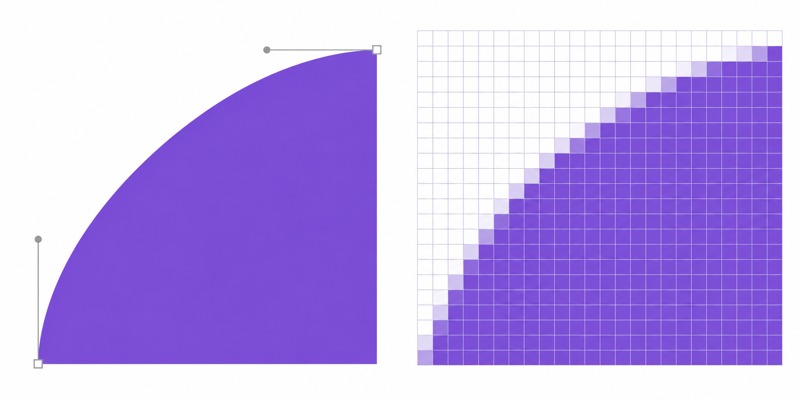
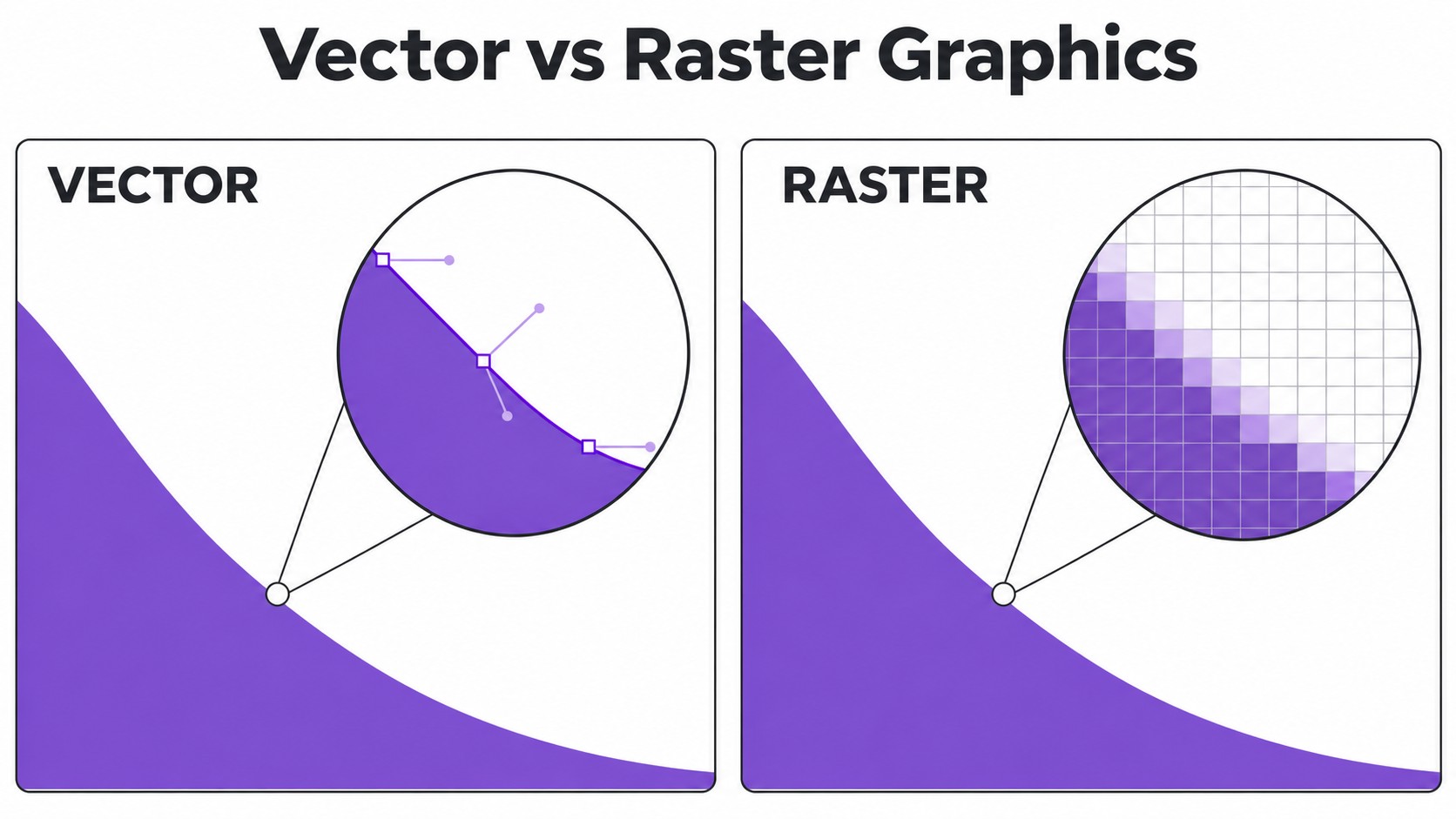
Vector graphics use mathematical paths to create shapes and lines, while raster graphics use a grid of pixels to represent an image. Vector graphics can be scaled without losing edge sharpness, whereas raster graphics depend on having enough image resolution at the final printed size.
Both formats are essential in commercial printing. Logos, typography, and many illustrations are ideally maintained as vectors, while photographs and other continuous-tone images are generally best represented as raster images.
Understanding when to use each format helps print shops, designers, and resellers prepare sharper artwork, avoid unnecessary quality loss, and reduce file-related production delays.
What Are Vector Graphics?
Vector graphics are constructed from mathematically defined paths, points, curves, and shapes rather than a fixed grid of pixels.
A vector illustration might contain a series of curved paths forming a logo, with specific fill colors, strokes, and geometric relationships.
Because these elements are mathematically defined, software can recalculate their appearance at different sizes without sacrificing the precision of their edges.
Advantages of Vector Graphics
- Resolution independence: Vector shapes remain sharp when enlarged or reduced.
- Clean edges: Lines, curves, and geometric shapes reproduce with well-defined boundaries.
- Editability: Individual paths, shapes, and colors can often be modified independently.
- Efficient scaling: One vector logo can be used across multiple print sizes.
- Precision: Vector artwork is particularly useful for technical diagrams, typography, and geometric designs.
For example, a properly constructed vector logo can be reproduced on both a business card and a poster without needing to recreate the artwork at a higher resolution.
However, vector graphics are not immune to every production limitation. Extremely thin lines, small details, and closely spaced elements may still be difficult to reproduce, depending on the printing process, substrate, and finished dimensions.
Common Uses for Vector Graphics
Vector artwork is generally preferred for:
- Company logos and brand marks
- Typography and lettering
- Icons and symbols
- Line drawings and technical illustrations
- Geometric patterns
- Charts and diagrams
- Simple flat-color illustrations
Vector graphics are especially valuable when artwork must be reused across products with different dimensions.
ND4C Production Recommendation: ND4C recommends using vector artwork for logos, text, and line drawings whenever suitable vector files are available. Maintaining these elements as vectors helps preserve clean edges and consistent reproduction across different print sizes.
What Are Raster Graphics?
Raster graphics, also called bitmap images, are constructed from a rectangular grid of pixels.
Each pixel contains color information. Together, these pixels create photographs, textures, illustrations, and other images.
Unlike vector paths, a raster image contains a finite number of pixels.
When enlarged beyond the size its resolution can adequately support, the available pixels must be spread across a larger area or new pixels must be estimated through interpolation.
This can make edges appear soft, jagged, or visibly pixelated.
Advantages of Raster Graphics
Raster images are particularly effective at reproducing complex visual information.
They are well suited for:
- Photographs
- Continuous color transitions
- Fine textures
- Realistic shadows and highlights
- Detailed photographic composites
- Complex digital paintings
A photograph containing thousands of subtle variations in color and brightness is usually better represented as raster artwork than as a collection of vector shapes.
Raster graphics are not inherently inferior to vector graphics. A properly prepared raster image can produce excellent commercial print results.
The important consideration is whether the image contains sufficient resolution for its intended reproduction size.
Raster Resolution and Printed Size
Raster resolution is commonly expressed in pixels per inch (PPI).
PPI describes how densely an image's pixels are distributed when reproduced at a particular physical size.
For routine ND4C print applications, 300 PPI at final reproduction size is the standard recommendation.
For example:
| Image Dimensions | Printed Size | Effective Resolution |
|---|---|---|
| 1,200 × 1,800 pixels | 4 × 6 inches | 300 PPI |
| 1,200 × 1,800 pixels | 8 × 12 inches | 150 PPI |
| 1,200 × 1,800 pixels | 12 × 18 inches | 100 PPI |
The same image contains exactly the same number of pixels in all three examples. Only its printed dimensions change.
This is why enlarging a raster image can reduce its effective resolution even when the original file appears sharp on a computer screen.
For a more detailed explanation, see the related Print Playbook guides 300 DPI Explained and Image Resolution for Printing.
Vector vs Raster Graphics: Key Differences
| Feature | Vector Graphics | Raster Graphics |
|---|---|---|
| Construction | Mathematical paths and shapes | Grid of pixels |
| Scaling | Resolution-independent | Limited by available pixels |
| Edge Quality | Sharp at different sizes | Can soften or pixelate when enlarged |
| Best Suited For | Logos, text, icons, line art | Photographs, textures, complex imagery |
| Typical Editing | Paths, shapes, fills, strokes | Pixels, image adjustments, retouching |
| Common Formats | AI, EPS, SVG, vector PDF | JPEG, PNG, TIFF, raster PDF |
| Print Suitability | Excellent for clean graphic elements | Excellent when resolution is sufficient |
Key Takeaway: The best print artwork often combines vector and raster elements in the same document. Vector graphics preserve precise lines and shapes, while raster graphics reproduce photographic detail and complex tonal variations.
Which Graphics Should Be Vector and Which Should Be Raster?
Logos and Brand Marks
Vector graphics are generally the preferred format for logos.
A vector logo maintains consistent shape and edge quality across business cards, postcards, brochures, and posters.
Raster logos can still print acceptably when they have sufficient resolution at their intended size. However, enlarging a small raster logo can produce visible softness or pixelation.
Whenever possible, request the original vector logo from the client or designer.
ND4C File Review: When a submitted raster logo is visibly pixelated or has insufficient image quality, ND4C typically requests corrected artwork before proceeding. Supplying the original vector file can help prevent this type of production delay.
Text and Typography
Text should generally remain as live text or be converted to vector outlines when appropriate for the production workflow.
Rasterizing text converts letterforms into pixels. This can reduce the precision of small characters, thin strokes, and fine typographic details.
Keeping text in its native form also helps preserve sharp edges through scaling and output processing.
Font embedding and outlining are separate considerations covered in the Fonts and Outlining Text guide.
Photographs
Photographs are normally best maintained as raster images.
A high-resolution JPEG or TIFF can reproduce photographic detail, realistic textures, and subtle tonal transitions effectively.
Converting a photograph into vector artwork is generally unnecessary and may substantially change its appearance.
The more important preparation steps are ensuring adequate effective resolution and appropriate color handling.
Illustrations and Detailed Artwork
The best format depends on how the illustration was created.
Simple geometric illustrations often benefit from vector construction.
Highly detailed digital paintings, textured artwork, or complex photographic composites may be better maintained as raster images.
Some illustrations combine both formats.
For example, a promotional flyer might contain:
- A raster photographic background
- Vector decorative shapes
- Vector typography
- A vector company logo
This mixed approach is common in professional commercial printing.
Common Vector and Raster File Formats
File extensions can provide clues about artwork construction, but they do not always prove whether the content is actually vector or raster.
| Format | Typical Content | Important Considerations |
|---|---|---|
| AI | Primarily vector artwork | Adobe Illustrator files can also contain embedded or linked raster images. |
| EPS | Vector and/or raster content | Legacy graphics format; actual contents vary. |
| SVG | Primarily vector artwork | Can contain embedded or linked raster images; production compatibility varies. |
| Vector, raster, or both | Common print-delivery container; content depends on how the PDF was created. | |
| JPEG / JPG | Raster | Common for photographs; uses lossy compression. |
| PNG | Raster | Supports transparency and lossless compression; not inherently print-ready. |
| TIFF / TIF | Raster | Common for high-quality photographs and other raster artwork. |
Does a PDF Automatically Mean the Artwork Is Vector?
No. PDF is a document container, not a guarantee of vector construction.
A PDF can contain:
- Vector paths
- Live or outlined text
- Raster photographs
- Rasterized logos
- Transparency and other graphical elements
For example, exporting a low-resolution JPEG logo into a PDF does not convert that logo into vector artwork. The logo remains raster.
Similarly, a PDF created by flattening an entire design into one bitmap may contain no independently editable vector artwork.
Saving a raster image as a PDF does not improve its underlying resolution.
The same principle applies when placing a raster image into an AI, EPS, or SVG file. The surrounding file format does not automatically change the image's construction.
ND4C Production Note: ND4C accepts properly prepared print PDFs containing both vector and raster elements. Raster images must have suitable effective resolution, and the complete artwork must meet the applicable product specifications. Customers do not need to convert every image into vector artwork.
Why Avoid Unnecessary Rasterization?
Rasterization is the process of converting vector artwork, text, or other graphical content into pixels.
It is a normal and necessary part of many imaging workflows. Printing systems ultimately translate digital artwork into device-specific output.
However, unnecessarily rasterizing artwork during file preparation can reduce flexibility and introduce avoidable quality limitations.
For example, consider a brochure containing:
- A vector logo
- Small vector text
- High-resolution raster photographs
If the entire brochure is rasterized at an insufficient resolution, the logo and typography may lose some of their original edge precision.
The rasterized document also becomes more difficult to edit because individual text and vector elements may no longer be independently accessible.
When Rasterization May Be Appropriate
Rasterization can be useful when preparing certain effects, textures, illustrations, or incompatible graphical elements.
It may also be deliberately performed within a controlled prepress workflow.
The important distinction is between intentional rasterization for a defined purpose and unnecessary conversion that sacrifices quality or editability.
As a general practice, preserve vector elements whenever practical and retain adequate resolution for raster images.
Can You Convert Raster Graphics Into Vector Graphics?
Yes, but the result depends heavily on the source artwork.
Vector-tracing software attempts to recreate raster artwork using mathematical paths.
This works reasonably well for some simple graphics, particularly those with:
- Clear boundaries
- Solid colors
- Minimal shading
- Simple geometric shapes
However, automatic tracing does not necessarily recreate the original design accurately.
A low-resolution logo may produce irregular curves, excessive anchor points, distorted letterforms, or inaccurate details.
For important brand artwork, obtaining the original vector file or professionally reconstructing the graphic is often preferable.
Does Increasing Raster Resolution Improve Image Quality?
Not necessarily.
Resampling software can add pixels, but the additional pixels do not automatically restore detail that was absent from the original image.
Modern image-enhancement tools may estimate plausible details, but those details are not equivalent to information captured in the original artwork.
For commercial print preparation, obtaining an appropriate high-resolution source is generally preferable to enlarging a low-resolution image.
How to Prepare Vector and Raster Artwork for Commercial Printing
A practical workflow is to preserve the strengths of both formats.
1. Keep Logos and Graphic Elements in Vector Form
Use original vector artwork when available.
ND4C recommends vector logos, text, and line drawings whenever practical. Avoid replacing these elements with screenshots or low-resolution images.
2. Verify Raster Resolution at Final Size
Check effective image resolution after placing and scaling photographs or other raster elements.
For routine ND4C printing, use 300 PPI at the intended reproduction size.
3. Avoid Rasterizing Entire Layouts Unnecessarily
Preserve vector text, shapes, and logos where possible.
Do not flatten a complete design into a low-resolution bitmap simply to create a single file.
4. Confirm the Contents of Supplied PDFs
Do not assume that a PDF contains vector artwork.
Inspect logos, fine text, and photographic elements at high magnification when evaluating supplied files.
Magnification can reveal obvious defects, but it should not replace checking effective resolution and inspecting the actual PDF objects when needed.
5. Use the Printer's Product-Specific Template
Artwork must also meet the dimensional and finishing requirements of the selected product.
ND4C provides free downloadable artwork templates for every catalog product and strongly recommends using them.
These templates help designers prepare artwork using the correct product dimensions, bleed, and other applicable layout boundaries.
ND4C's standard bleed is 0.125 inch on nearly all products, but the selected product's template should always take precedence.
For the broader submission workflow, see the PDF Print File Requirements and How to Prepare Files for Commercial Printing guides.
Common Vector and Raster Artwork Mistakes
| Mistake | Potential Result | Recommended Prevention |
|---|---|---|
| Enlarging a small raster logo | Soft or pixelated edges | Obtain original vector artwork. |
| Using a low-resolution photograph | Reduced detail and sharpness | Check effective PPI at final size. |
| Rasterizing small text | Reduced edge precision | Preserve live or vector text. |
| Assuming every PDF is vector | Undetected rasterized graphics | Inspect actual PDF contents. |
| Automatically tracing a poor-quality logo | Irregular or inaccurate shapes | Obtain or reconstruct original artwork. |
| Unnecessarily flattening a layout | Reduced editability and potential quality loss | Preserve original design elements. |
| Ignoring product templates | Incorrect dimensions, bleed, or positioning | Use the printer's provided template. |
In wholesale printing, identifying these issues before submission can help avoid artwork revisions and production delays.
ND4C regularly encounters missing bleed, incorrect finished dimensions, and essential text positioned too close to trim. These problems may require corrected files before production can proceed.
Customers who need assistance with artwork corrections can also inquire about ND4C's optional paid File Fix service, performed by an in-house designer.
Frequently Asked Questions
Are vector graphics always better for printing?
No. Vector graphics are generally better for logos, text, and geometric illustrations, while high-resolution raster graphics are better suited for photographs and complex continuous-tone imagery. Professional print layouts frequently contain both.
Can raster images print at high quality?
Yes. Raster images can produce excellent print results when they contain sufficient resolution at their intended reproduction size and are prepared appropriately for the printing process.
Is a PNG file a vector graphic?
No. PNG is a raster image format. It can contain transparent areas and high-resolution imagery, but its contents are still pixel-based.
Is a PDF a vector file?
A PDF may contain vector artwork, raster images, or both. Its contents depend on the original artwork and how the PDF was created.
Can I convert a JPEG logo into a vector graphic?
A JPEG can be traced or manually recreated as vector artwork. However, simply changing its extension or saving it inside a vector-capable file does not convert the pixels into paths.
What happens if I enlarge a raster image?
Its effective resolution decreases as its printed dimensions increase. If the remaining resolution is insufficient, the printed image may appear soft or pixelated.
Should all artwork be converted to vector before printing?
No. Photographs and complex raster illustrations should generally remain raster images. Vector conversion is most useful for suitable elements such as logos, lettering, and geometric graphics.
Does converting vector artwork into a PDF reduce quality?
Not inherently. A properly created PDF can preserve vector paths and text. However, export settings or artwork-processing choices that rasterize or downsample content can affect quality.
Choosing the Right Artwork for Wholesale Printing
The goal is not to make every element vector or every image raster.
It is to use the format best suited to the content and preserve its quality throughout file preparation.
For print resellers, designers, and retail print shops, that generally means maintaining logos and typography as vectors, retaining photographs at sufficient effective resolution, and following the selected printer's artwork specifications.
ND4C offers wholesale printing across a broad range of standard products, with downloadable artwork templates to support accurate file preparation.
Ready to prepare your next print project?
Explore ND4C's product catalog and free artwork templates to prepare files for wholesale production.
New to ND4C? Sign up to access exclusive trade and wholesale pricing.
ND4C is a wholesale trade printer with more than two decades of industry experience. Our Print Playbook guides draw on firsthand expertise across prepress, production, customer support, design, and print technology to help retail printers and print resellers make better production decisions.